Discovered this mapping that feels pretty nice. In regular apps, I use btn4 (top right) to change the ball to pan & scroll, but twist for hyperscrolling (6x speed). I like this because I don’t tend to use zoom very much in most apps.
Import this profile
New in 1.6: Import this with one click. Make sure it’s lower than the 3D navigation profiles (nav_*) in priority:
format: rotatrix-bundle
format_version: 1
exported_by: 1.6.0b2
root:
  kind: profiles
  name: default_hyperscroll
  definition:
    description: Alternative default profile with enhanced software-based scrolling. Button 4 activates smooth, simultaneous horizontal and vertical scrolling, with twist to hyperscroll (4x speed scroll).
    triggers: [ always ]
    ball_mode: mouse
    bindings:
      - name: 2D Pan/Scroll/Zoom
        label: { text: 2D Pan/Scroll/Zoom, mode: replace }
        description: Roll ball up/down to scroll, left/right to pan, twist to hyperscroll.
        triggers: [ btn:4 ]
        ball_mode: rotatrix
        axis_map: software_scroll_hyperscroll
dependencies:
  - kind: axis_maps
    name: software_scroll_hyperscroll
    definition:
      axis_dominance: hard_decouple_snap_axis
      wx: { output: -scroll_y, osd: -scroll_y }
      wy: { output: scroll_x, osd: scroll_x }
      wz: { output: scroll_y, osd: scroll_y, gain: 4 }
  - kind: axis_dominance_presets
    name: hard_decouple_snap_axis
    definition:
      decouple_enabled: true
      decouple_soft: false
      decouple_threshold: 2
      single_axis_mode: snap
      single_axis_snap_deadzone: 0.3
      single_axis_snap_full: 0.8
    built_in: unchanged
Previous instructions
First, create an axis map software_pan_scroll_hyperscroll:
wx:
  output: -scroll_y
  osd: -scroll_y
wy:
  output: scroll_x
  osd: scroll_x
wz:
  output: scroll_y
  osd: scroll_y
  gain: 6
axis_dominance: hard_decouple_snap_axis
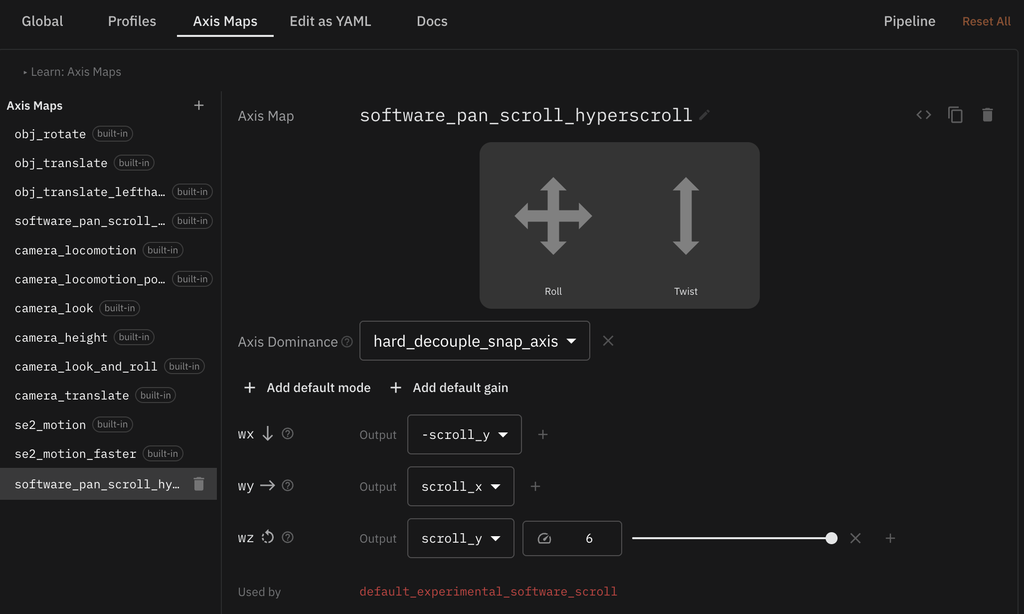
You can tweak the twist (wz) gain to your taste. It looks like this in the editor:
To use the axis map: I customized the default_experimental_software_scroll to use this new axis map when btn4 is pressed. Make sure it’s lowest priority in the list of profiles so as not to prevent your other app-specific profiles from triggering.
description: Enable this alternative default config for enhanced software-based
  scrolling. Btn4 gives software pan/scroll/zoom, which supports smooth,
  simultaneous XY scrolling and zoom support.
triggers:
  - os:windows
  - os:mac
  - os:linux
ball_mode: mouse
bindings:
  - description: Roll ball up/down to scroll, left/right to pan, twist to zoom.
    name: 2D Pan/Scroll/Zoom
    triggers:
      - btn:4
    ball_mode: rotatrix
    axis_map: software_pan_scroll_hyperscroll
    label:
      text: 2D Pan/Scroll/Zoom
      mode: replace