Hi David, Continuing my review comments, here is how I think the buttons should be allocated. My use is at present entirely in Fusion, but I think it would be similar in any 3-D application. Everything is at the latest software version.
Left rear button (press and release): return to pointer mode, do nothing if already in that mode.
Right rear button (press and release): If in pointer mode, switch to orbit mode. Otherwise toggle between orbit mode and pan and zoom mode.
The left front button can still be ‘snap rotation to axis’ in orbit mode.
Obviously, if focus is switched away from a supported 3-D app, the mode should automatically be returned to pointer mode. MAYBE the mode should be remembered per app so when you switch back it returns to the mode it was in previously.
The modes should be ‘sticky’ i.e. you do not have to hold the buttons down. BUT this means there needs to be some indication permanently on screen of what mode the device is in. Changing the Rotatrix icon was a suggestion since it is always in the menu bar (Mac) and at the bottom of the Fusion canvas. Since the icon is a globe with red meridians (highlights), I suggested having different meridian colours for each of the three modes.
In any case, many thanks for this excellent product. Such a blast of fresh air after years struggling with the gyro-toppling and sensor drift pathologies of the SpaceMouse! Now I want it to work (as a jog wheel and colour grading ball) in DaVinci Resolve!
Thanks John! Sticky device-button control is possible now, but we don’t yet have the mechanism to implement your exact left-button reset / right-button cycle scheme.
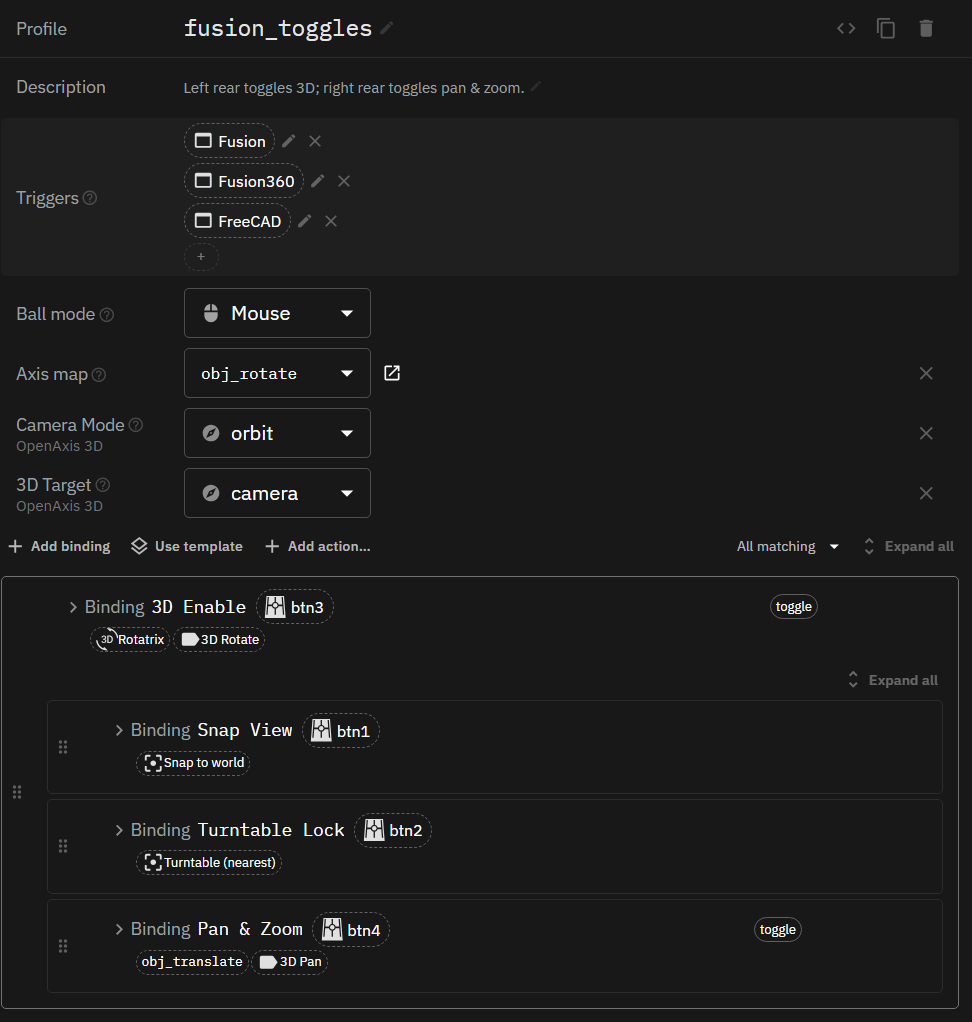
Try this profile, you can call it fusion_toggles: (How to share and import Rotatrix profiles)
description: "Left rear toggles 3D; right rear toggles pan & zoom."
triggers: [ app:Fusion, app:Fusion360, app:FreeCAD ]
ball_mode: mouse
navigation_mode: orbit
axis_map: obj_rotate
bindings:
  - name: 3D Enable
    triggers: [ btn:3 ]
    behavior: toggle
    ball_mode: rotatrix
    label: 3D Rotate
    bindings:
      - name: Snap View
        triggers: [ btn:1 ]
        snap_rotation: world
      - name: Turntable Lock
        triggers: [ btn:2 ]
        snap_rotation: turntable_nearest
      - name: Pan & Zoom
        triggers: [ btn:4 ]
        behavior: toggle
        axis_map: obj_translate
        label: 3D Pan
(I’m using 1.6 beta so it looks slightly different)
The left rear switches between pointer and 3D; the right rear selects orbit or pan & zoom. That selection is remembered when you turn 3D off and on.
It uses an OSD text label that shows up whenever 3D mode is enabled.
The limitation is that toggle state belongs to each binding, so we don’t yet have shared modes that either button can select or reset.
Try it and let me know how it feels. I’ll note a feature request for shared modes to get closer to the behavior you specified.
David
Many thanks David,
Surprised the script is so terse - I expected it to take more bindings than that. It does feel good and close to what I had in mind.
It would be helpful to have more commented examples in the documentation, and more complete documentation. I’m guessing that the ‘LABEL:’ key is what produces the OSD, but that does not seem to be documented at all.
I noticed an anomaly with the OSD: you can move the pointer with another device when Rotatrix is in 3-D mode. If you do this on a multi-monitor setup (on MacOS) the OSD appears on the monitor containing the pointer not the monitor containing the Fusion window (and if the Fusion window is not full screen, it appears bottom right of the monitor, not bottom right of the window). I still think it needs an indicator that is permanently present at least in 3-D mode. If you do not like my icon colour suggestion, a much smaller OSD would serve.
John.
Thanks John, glad the profile is close to what you had in mind!
Yes, label: sets the OSD text. A string replaces the current label. It’s documented in the 1.6 beta under Config → Docs → Reference → Binding actions, though it wasn’t included in the 1.5.1 reference.
The OSD is intended to follow the mouse. It was originally designed to appear temporarily during a gesture, but I can see how that becomes a problem with always-on 3D mode, especially when another device moves the pointer to a different monitor. Your point about a persistent mode indicator makes sense in that use case. You could log a new thread in Product Ideas category
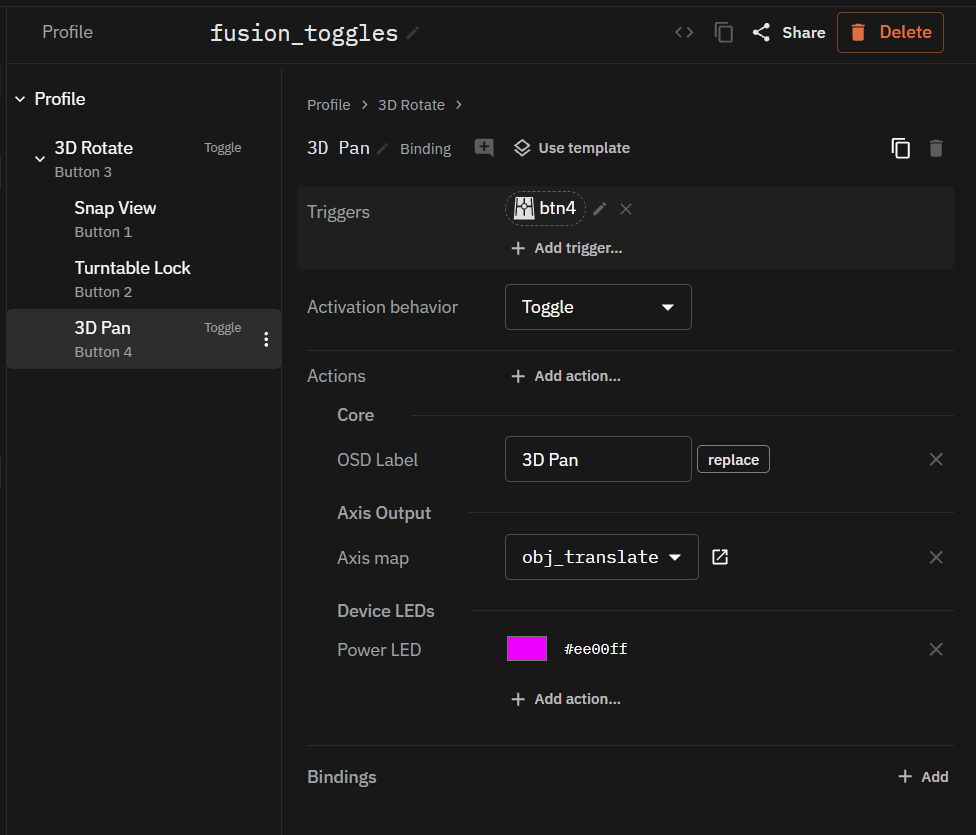
In the meantime, here is a hidden feature that now has a proper UI in the 1.6 beta. On the Wired device, you can set the LED color on the left LED and the brightness on the right LED. I have it bright green in 3d rotate and magenta in 3d pan. If you upgrade to 1.6 you can also try installing this shared profile by clicking Install in Rotatrix. (Note the trigger is also changed for 1.6, no need for app-specific triggers anymore - this works for all OpenAxis navigation integrations.)
format: rotatrix-bundle
format_version: 1
exported_by: 1.6.0b2
root:
  kind: profiles
  name: nav_toggles
  definition:
    description: Left rear toggles 3D enable; right rear toggles 3D rotate vs pan.
    triggers: [ tag:capability.navigation ]
    ball_mode: mouse
    axis_map: obj_rotate
    bindings:
      - name: 3D Rotate
        triggers: [ btn:3 ]
        behavior: toggle
        ball_mode: rotatrix
        label: { text: 3D Rotate, mode: replace }
        bindings:
          - name: Snap View
            triggers: [ btn:1 ]
            snap_rotation: world
          - name: Turntable Lock
            triggers: [ btn:2 ]
            snap_rotation: turntable_nearest
          - name: 3D Pan
            triggers: [ btn:4 ]
            behavior: toggle
            axis_map: obj_translate
            label: { text: 3D Pan, mode: replace }
            indicator: { pwr: "#ee00ff" }
        indicator: { pwr: "#2bff00" }
    camera_mode: orbit
    navigation_target: camera
    indicator: { pwr: "#000000" }
dependencies:
  - kind: axis_maps
    name: obj_rotate
    definition:
      axis_dominance: "off"
      wx: { output: rx, osd: obj rx }
      wy: { output: ry, osd: obj ry }
      wz: { output: rz, osd: obj rz }
    built_in: unchanged
  - kind: axis_dominance_presets
    name: "off"
    definition: { decouple_enabled: false }
    built_in: unchanged
  - kind: axis_maps
    name: obj_translate
    definition:
      axis_dominance: soft
      wx: { output: -ty, osd: obj -ty }
      wy: { output: tx, osd: obj tx }
      wz: { output: -tz, osd: obj -tz }
    built_in: unchanged
  - kind: axis_dominance_presets
    name: soft
    definition:
      decouple_enabled: true
      decouple_soft: true
      decouple_threshold: 2
      decouple_soft_power: 2
      decouple_smooth: true
    built_in: unchanged